duf: A Better Way to Check Disk Usage
If you've ever squinted at the output of df -h trying to make sense of your disk space, it's time to meet duf – a modern, colorful alternative that actually makes disk usage information pleasant to look at.


What Makes duf Different?
Created by Christian Meusel, duf takes the essential functionality of the classic df command and presents it in a way that humans can actually parse quickly. Instead of a wall of monochrome text, you get:
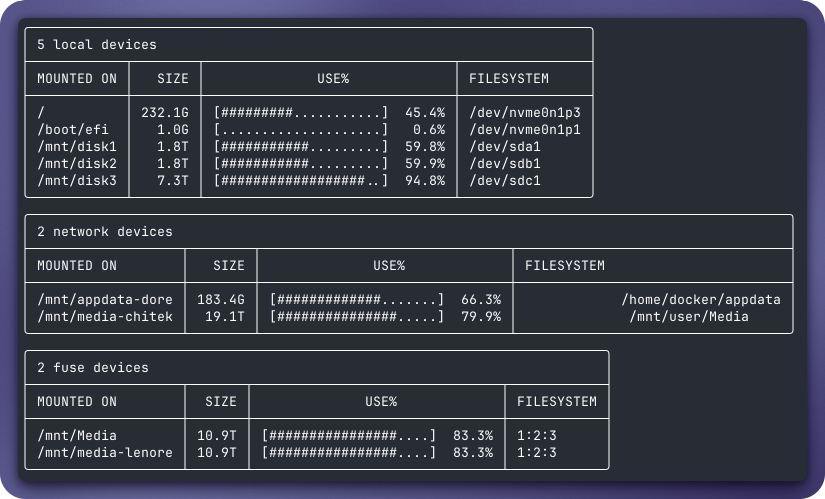
- Color-coded output that uses visual cues to show disk usage at a glance
- Smart grouping that separates local disks, network mounts, and special filesystems
- Clean tables with proper alignment and readable formatting
- Usage bars that give you an instant visual sense of how full each filesystem is
Installation
Getting duf is straightforward on most systems:
bash
# macOS
brew install duf

# Ubuntu/Debian
sudo apt install duf

# Arch Linux
sudo pacman -S duf
Or grab a pre-built binary from the releases page.
Why You'll Actually Use It
The beauty of duf is that it requires zero configuration. Just type duf and you immediately get organized, color-coded information about your disks. Local drives are separated from network shares, and those weird pseudo-filesystems that clutter up df output are hidden by default (but available with --all if you need them).
For anyone managing Docker containers, running multiple drives, or just wanting to quickly check available space without decoding cryptic mount points, duf is one of those small tools that makes daily terminal work just a bit more enjoyable.
Give it a try – your eyes will thank you.