Giving Claude Code a Live View of My Homelab
I connected Beszel's monitoring API to Claude Code so homelab troubleshooting starts with live server data instead of guesses. That one change made the workflow a lot more useful.


One thing kept bugging me whenever I used Claude Code to troubleshoot something in the homelab.
I'd tell it a server was acting up, or that a container refused to start, and the first few steps were always the same: check logs, run docker stats, look at memory pressure, maybe inspect the host. None of that was wrong, but Claude was starting blind every time. It had no idea what the machines actually looked like in that moment unless I pasted the data in by hand.
Meanwhile, I already had Beszel running.
It was collecting all the useful stuff in the background the whole time: CPU, memory, disk usage, load averages, uptime, and container-level stats. I just hadn't connected that data to the tool I was actually using for troubleshooting.
So I fixed that.
What Beszel Already Knows
Beszel is pretty easy to like in a homelab. The agents are lightweight, the UI is clean, and it gives you a solid per-system and per-container view without a lot of overhead.
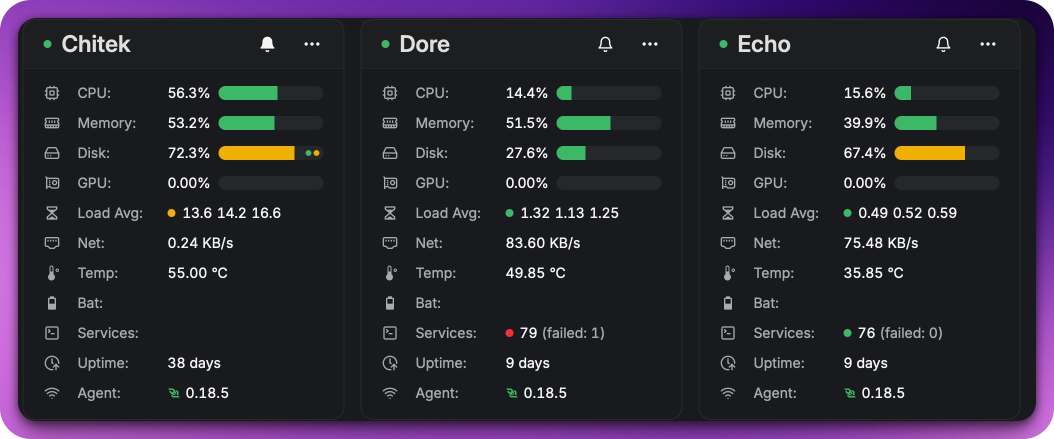
In my setup, several systems report back to the Beszel hub: the main servers (dore, lenore, echo, and chitek), a couple of Raspberry Pis, a laptop, and some other machines. Each one checks in every few minutes and sends back a current snapshot.
Under the hood, the hub exposes a PocketBase API with JWT auth, which made this a lot easier than I expected. For what I wanted, three collections cover almost everything:
| Collection | What's in it |
|---|---|
systems |
Current status for each machine: CPU, memory, disk, load, uptime, and general health |
system_stats |
Historical and lower-level stats like disk I/O, temperatures, swap, and network activity |
container_stats |
Per-container CPU and memory usage for a specific host |
That was really the missing piece. Claude didn't need another troubleshooting checklist. It needed a live starting point.
Turning It Into a Claude Skill
Claude Code has a skill system, so I created a Beszel-focused skill for my local setup.
That skill includes the API calls, the field mappings, and a summary script Claude can run right away. The API token lives in an environment file, which keeps it out of the skill itself and makes rotation simple when needed.
The summary script returns a quick table like this:
Server             Status  CPU%  Mem%  Disk%  Load(1m)     Uptime
-----------------------------------------------------------------
Chitek             up       7.0  53.1   72.3      1.49       927h
Dore               up      20.6  60.6   27.6      1.20       214h
Echo               up      14.1  34.1   65.8      0.29       228h
Lenore             up       5.1  31.1   47.8      0.54       232h
Raspberry Pi 4     up       4.7  29.9   24.8      0.21       241h
That one view is enough to answer a lot of the first questions immediately.
No SSH into multiple machines. No bouncing between hosts to run docker stats. Just one command and a current snapshot of the environment.
Making Sure Claude Uses It
Writing the skill only solved half the problem. The other half was making sure Claude actually used it at the right time.
I made two changes for that.
First, I updated my main Claude instructions so that if the task involves server performance, container health, or general homelab troubleshooting, it checks Beszel first before digging through logs.
Second, I updated the container-health workflow I already use and added a Step 0 that runs the Beszel summary before anything else. That way even if Claude doesn't independently think, "I should query Beszel here," the workflow still pushes it in that direction.
That small change makes a real difference.
If I say a server seems slow, Claude can now start with actual numbers instead of guesses. Maybe it sees memory sitting around 60%, a load average around 1, and a pile of running containers before it ever opens a single log file. That changes the rest of the investigation in a useful way.
The Weird Beszel Field Names
If you've looked at Beszel's raw API output, you've probably noticed the info object uses very short keys. They make sense once you know them, but they aren't especially readable at first glance.
Here's the quick reference I added to the skill:
| Key | Meaning |
|---|---|
cpu |
CPU usage % |
mp |
Memory usage % |
dp |
Root disk usage % |
la |
Load averages as [1m, 5m, 15m] |
u |
Uptime in seconds |
sv |
[running containers, stopped containers] |
efs |
Extra filesystems as {mount: usage%} |
g |
GPU usage % where available |
bat |
Battery as [level%, state] on laptops |
The system_stats collection goes a level deeper with disk read/write data (dr, dw), temperatures (t), and per-interface network stats (ni). That's the stuff I care about once I've already figured out which host deserves a closer look.
Where This Probably Goes Next
The immediate benefit here is better troubleshooting, but I can already see a second use for it.
A lot of homelab documentation is only accurate on the day it's updated. Server specs, disk usage, memory allocations, container counts, all of that drifts over time. Beszel already has the live data, so it would be pretty easy to build a workflow that periodically pulls those values and updates the right notes automatically.
I haven't built that part yet, but it's an obvious next step.
For now, the win is simpler: Claude no longer starts from zero when something looks off.
Next in the series: How I Made Claude Code a Consistent Tool Across My Homelab.